
Notebook Review
Dell XPS 9510 Review: Chasing a Near-Ideal Multimedia Laptop
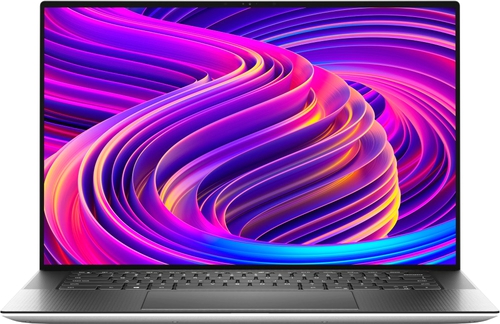
Editor's note: This is an original English adaptation based on the Notebook-Center.ru review dated February 22, 2022, rewritten for local Notebook Center preview use.
Overview
The Dell XPS 9510 sits in the premium multimedia and creator-laptop category, where buyers expect strong performance, refined industrial design, and a screen worth paying extra for. In the reviewed configuration, Dell combines an Intel Core i7-11800H, NVIDIA GeForce RTX 3050 Ti graphics, 16 GB of memory, and a 15.6-inch OLED touch display with a 16:10 aspect ratio. At around the original review price of $2,500, this is clearly not a mass-market machine. The appeal comes from execution rather than value pricing.
Technical Specifications
| Processor | Intel Core i7-11800H |
|---|---|
| Memory | 16 GB DDR4-3200 |
| Storage | 512 GB SSD |
| Display | 15.6-inch 3456x2160 OLED, glossy, touch, 16:10 |
| Graphics | Intel integrated graphics plus NVIDIA GeForce RTX 3050 Ti 4 GB |
| Wireless | Wi-Fi 6, Bluetooth 5.1 |
| Audio | Four speakers |
| Ports | 2 x Thunderbolt 4 / USB-C, 1 x USB-C, full-size SD card reader, audio combo jack |
| Webcam | 720p |
| Security | Fingerprint reader in the power button |
| Battery | 86 Wh |
| Size and weight | 344 x 230 x 18 mm, 2.0 kg |
| OS | Windows 10 Pro 64-bit |
Design
Dell keeps the XPS formula intact here, and that is mostly a good thing. The exterior stays clean and modern, with silver outer surfaces and a black keyboard deck that gives the machine a more technical, less decorative look. The original review highlights the excellent build quality: the metal chassis feels solid, panel fit is tight, and even pressure on the lid does not cause visible distortion on the display.
The notebook is also relatively serviceable for this class. Internal access is straightforward once the bottom screws are removed, and the platform offers two RAM slots and two M.2 slots, which is a practical advantage for users who plan to keep the laptop for several years.
Display, Audio, and Webcam
The screen is one of the headline features. Dell uses a 15.6-inch OLED touch panel with a 3456x2160 resolution, a 16:10 aspect ratio, and very strong color coverage. According to the source review, sRGB coverage reaches 100% and AdobeRGB coverage about 98%, which makes the display suitable for many photo and design workflows. Black levels, contrast, and perceived sharpness are all major strengths.
There is, however, an important caveat. The source review calls out low-frequency PWM, which can be a serious issue for users who are sensitive to display flicker. That matters because this is exactly the kind of notebook people may use for long editing or work sessions. In other words, the panel is visually impressive, but not automatically comfortable for every buyer.
Audio is unusually strong for a Windows laptop. The four-speaker setup is described as well balanced and spacious, with enough quality to support media consumption and casual editing without immediately reaching for headphones. The webcam is far less impressive: 720p quality is only adequate for occasional calls.
Keyboard and Touchpad
The keyboard appears well tuned for productivity. Key presses are light, quiet, and clearly defined, while the white backlight helps in low-light environments. Dell omits a number pad, which keeps the main typing zone centered. The only ergonomic compromise noted in the source review is the vertically compressed up and down arrow keys.
The touchpad is exceptionally large and one of the notebook's standout usability traits. Its surface is smooth and responsive, though the physical click action can feel louder than ideal.
Performance
The Core i7-11800H gives the XPS 9510 strong upper-midrange compute performance for creative applications, multitasking, and demanding everyday work. With eight cores and sixteen threads, it is a credible CPU for content workflows rather than just office use. Dell pairs it with RTX 3050 Ti graphics, which is not top-tier creator silicon, but it is enough to accelerate many graphics applications and handle modern games at sensible settings.
The reviewed configuration includes 16 GB of DDR4 memory and a 512 GB SSD, while the platform itself leaves room to expand beyond that baseline. This is an important part of the XPS appeal: the machine is expensive, but it is not sealed into a dead-end configuration.
Ports and Connectivity
The port selection is modern but selective. Two Thunderbolt 4 ports and one additional USB-C port cover fast external storage, docks, and displays, while the full-size SD card reader is genuinely useful for creators. There is no built-in USB-A or HDMI, so some users will still need adapters, but the inclusion of SD is the right priority for the audience this system is targeting.
Wireless connectivity includes Wi-Fi 6 and Bluetooth 5.1, which remains fully appropriate for a premium notebook from this class.
Battery, Heat, and Noise
The 86 Wh battery gives the XPS 9510 respectable endurance for a high-resolution OLED system. The source review reports roughly 7 hours of web use at moderate brightness, about 5.5 hours at maximum brightness, and up to 10 hours for 1080p video playback. Heavy workloads cut that sharply, down to around 1 to 1.5 hours.
Thermals and acoustics are more reassuring. Even under gaming or video-editing scenarios, the chassis reportedly avoids critical heat buildup, with the palm rest staying comfortable and the fans remaining noticeable but not aggressively loud.
Verdict
The Dell XPS 9510 gets very close to what many buyers want from a premium 15-inch creator notebook. It offers a sharp and color-accurate OLED touch screen, strong CPU performance, useful RTX-class graphics, high-quality speakers, solid build quality, and real upgrade paths inside the chassis.
The main reason to hesitate is the display flicker behavior. For some users, PWM will be a minor footnote. For others, it will be a deal-breaker that overrides the beauty of the panel. If that specific weakness does not affect you, the XPS 9510 remains one of the more compelling multimedia laptops in this tier.